Product · For CA firms in India

RoSync for CA: practice software that chases clients so your team doesn't

RoSync tracks every client's GST, TDS, income-tax, audit and ROC due dates, collects documents over WhatsApp and email, reminds clients on its own and raises GST invoices - one place for the work your team now runs on Excel and phone calls.

One-time licenceYour data stays with your firmWhatsApp + emailUpdated for Income-tax Act, 2025
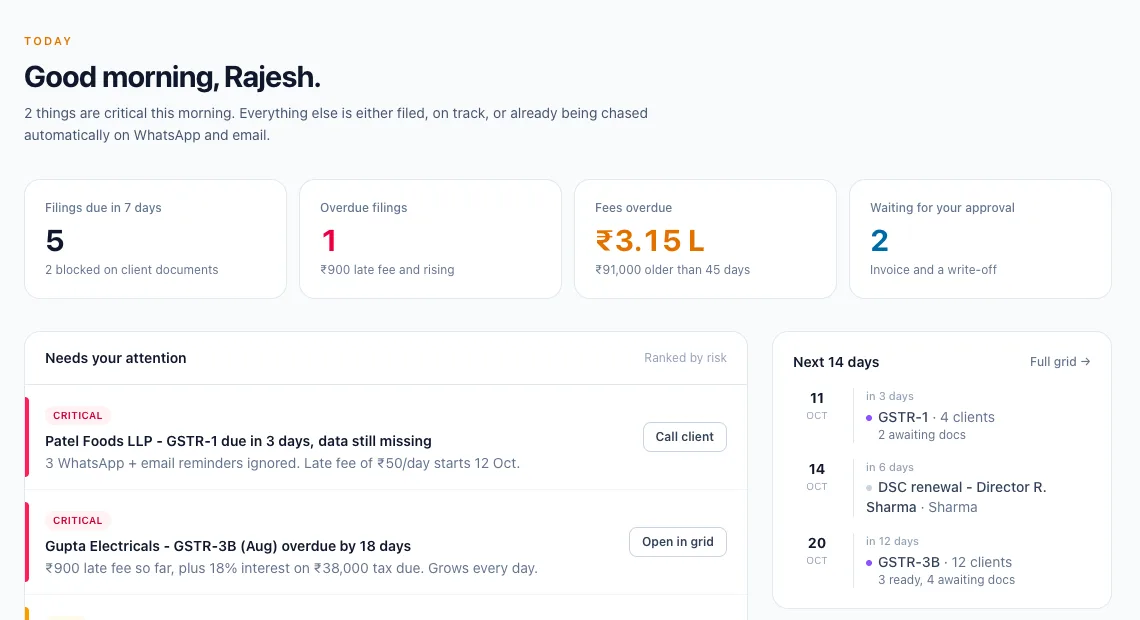
RoSync for CA Today screen: filings due in 7 days, overdue filings, fees overdue and items waiting for partner approval, ranked by risk

What is RoSync for CA?

RoSync for CA is practice management software for Chartered Accountant firms in India. It builds each client's compliance calendar from the services you provide, asks clients for the documents each return needs, sends reminders on WhatsApp or email, gets GST approvals by WhatsApp reply, and raises GST invoices with automatic fee follow-up. It is made by SoftSync Lab and sold as a one-time licence.

Everything between "client, please send" and "filed"

A compliance calendar that builds itself

Tick a client's services once and RoSync creates every due date - this month and every period after.

  • GST, TDS/TCS, ITR, tax audit, advance tax
  • ROC/MCA, PF, ESI, PT, DSC renewals
  • Your firm confirms each rule; official extensions applied

Documents without the chasing

A checklist for each return, sent to the client with a secure upload link - no app, no login.

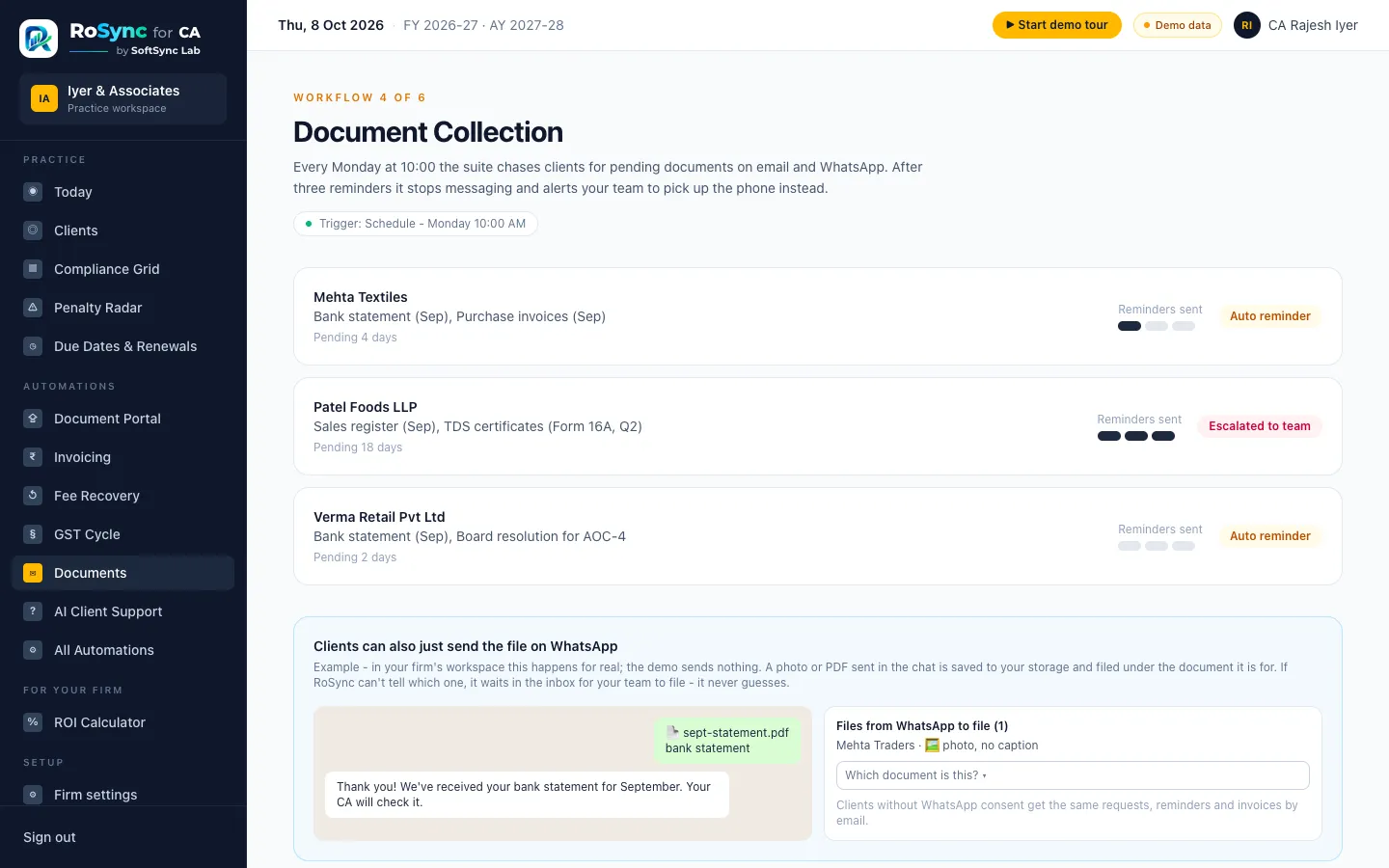
  • Clients can also just send it on WhatsApp
  • Accept, or send back with a reason
  • Everything stored in your firm's own storage

Reminders that go out on their own

Clients hear about due dates a few days ahead, and get a reminder every Monday until documents arrive.

  • After 3 reminders, your team is told to call
  • Each return mentioned once - no spam
  • Nothing goes out in test mode

WhatsApp and email, done properly

Official WhatsApp Business messages to clients who agreed - email for everyone else.

  • Approved message templates
  • GST summary approved by replying YES
  • Filing confirmation with acknowledgement number

GST invoices and fee recovery

Raise tax invoices, get partner approval above a limit, and let RoSync follow up on unpaid fees.

  • CGST + SGST or IGST worked out for you
  • Client invoice link with UPI / payment details
  • Reminder ladder, then a call for the partner

The partner's 9 AM summary

One message each morning with what needs the firm today.

  • Returns overdue, due today and this week
  • Documents to check, invoices to approve
  • Fees to collect and clients to call

How does RoSync track due dates for every client?

When you add a client and tick their services - GST monthly or QRMP, TDS, ITR, tax audit, ROC, PF/ESI - RoSync creates every return with its due date, for this period and every period after. Your firm confirms each due-date rule once; when CBDT or CBIC extends a date, the extension is applied for every firm.

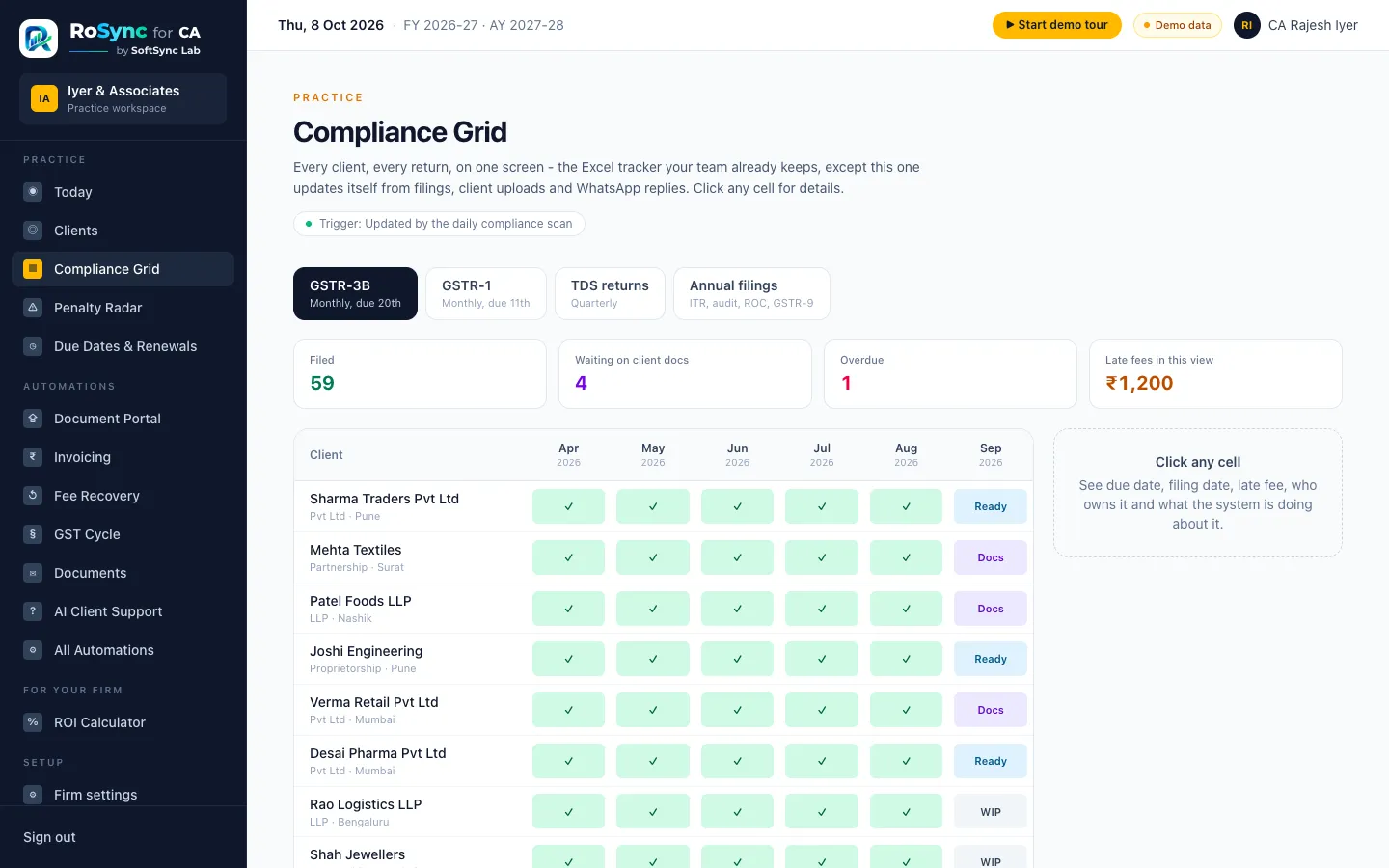
The grid shows every client and every return on one screen: filed, waiting for documents, ready, or overdue - with the late fee so far.

See all the dates RoSync tracks in our CA compliance calendar for 2026-27.

RoSync compliance grid listing clients by month with filed, waiting for documents and ready statuses
RoSync documents inbox: uploads to check, files from WhatsApp to file, and what each client still owes

How do clients send documents?

RoSync sends each client the checklist for their return with a secure upload link - photos or PDFs, no app and no login. Clients can also just send the file in your WhatsApp chat; RoSync files it under the right document, or keeps it for your team to sort when it isn't clear.

A few days before each due date the client gets one reminder listing what is due and what is still missing. If documents still haven't come after three weekly reminders, RoSync stops messaging and asks your team to call.

How do we get started with RoSync?

  1. 1

    Book a 20-minute demo

    We show you RoSync with the kind of clients and returns your firm handles, and answer your questions.

  2. 2

    We set RoSync up for you

    Your firm gets its own RoSync at your own web address, with secure logins for your team. Nothing to install - ready within a day.

  3. 3

    Add your clients

    Upload your client list from Excel and tick the returns you file for each. RoSync works out every due date.

  4. 4

    Practise, then go live

    In practice mode, messages come only to you. When you're comfortable, switch it on for your clients.

RoSync vs spreadsheets vs monthly software

How RoSync for CA compares with spreadsheets and subscription software
Excel + WhatsApp groupsTypical monthly softwareRoSync for CA
Due datesExcel tracker, updated by handGeneric calendar, often not India-specificBuilt from each client's services; GST, TDS, ITR, ROC, PF/ESI; extensions applied
Client documentsPhone calls and WhatsApp groupsClient portal with a loginNo-login upload link, or send in the WhatsApp chat
RemindersSomeone remembers to callEmail remindersWhatsApp (with consent) and email, then a call when needed
PricingFree, but costs staff hoursPer user, every monthOne-time licence
Your dataSpread across laptops and phonesShared database with other customersYour firm's own secure database

Frequently asked questions about RoSync for CA

What is RoSync for CA?

RoSync for CA is practice management software for Chartered Accountant firms in India. It tracks every client's GST, TDS, income-tax, audit, ROC and payroll due dates, collects documents from clients over WhatsApp and email, sends reminders automatically, and raises GST invoices - so the team spends its time filing, not chasing.

How is RoSync for CA priced?

RoSync is sold as a one-time licence, not a per-user monthly subscription. SoftSync Lab sets RoSync up for your firm at your own web address, and your data stays in your firm's own secure database. Pricing depends on the firm's size and add-ons - message us on WhatsApp for a quote.

Does RoSync file returns on the GST or income-tax portal?

No. Your team still files on the GST, TRACES, income-tax and MCA portals. RoSync tracks what is due, collects the documents, reminds clients, gets GST approvals, and records the filing date and acknowledgement number - then tells the client it is filed.

Which due dates does RoSync track?

GST returns (GSTR-1, GSTR-3B, QRMP, composition, GSTR-9/9C and others), TDS/TCS deposits and quarterly statements, income-tax returns, tax audit reports, advance tax, ROC/MCA filings, PF, ESI, professional tax and DSC renewals. Form names follow the Income-tax Act, 2025. The firm confirms each rule once, and official extensions are applied for every firm.

Do clients need to install an app or log in?

No. Clients get a secure upload link that works on any phone without a login, or they can simply send the photo or PDF in the firm's WhatsApp chat. RoSync files it under the right document, or keeps it for staff to sort if it can't tell.

Is the WhatsApp messaging official?

Yes. RoSync uses Meta's official WhatsApp Business Platform with approved message templates, and only messages clients who have given consent. Clients without WhatsApp consent get the same requests and reminders by email.

Where is our firm's data stored?

Each firm gets its own database and its own app in accounts owned by the firm - not a shared database with other firms. SoftSync Lab sets it up and maintains it, but the data belongs to the firm.

Can we try it before buying?

Yes. The live demo at ca.softsyncsolutions.in has a sample CA firm with clients, filings, documents and invoices you can click through. Every new firm also starts in a test mode, where messages go only to the firm's own phone and email until a partner switches it live.

Can we import our existing clients from Excel?

Yes. RoSync gives you an Excel template; fill in client name, PAN, GSTIN, mobile and services, upload it, and RoSync checks every row (PAN, GSTIN and TAN formats, duplicates) before importing and building each client's compliance calendar.
See your own firm in RoSync

Open the demo firm and click around, or message us for a 20-minute walkthrough with your own due dates and clients.

Made in India by SoftSync Lab · Last updated 16 October 2026